AI Image Humanizer

AI image looks too plastic? One click removes the waxy skin and over-polished look so it reads like a real camera shot

Portraits show the biggest change; product, scene and food shots also work, with subtler results

10credits / run

Describe what you imagine, AI brings it to life

Example

AfterBeforeBeforeAfter

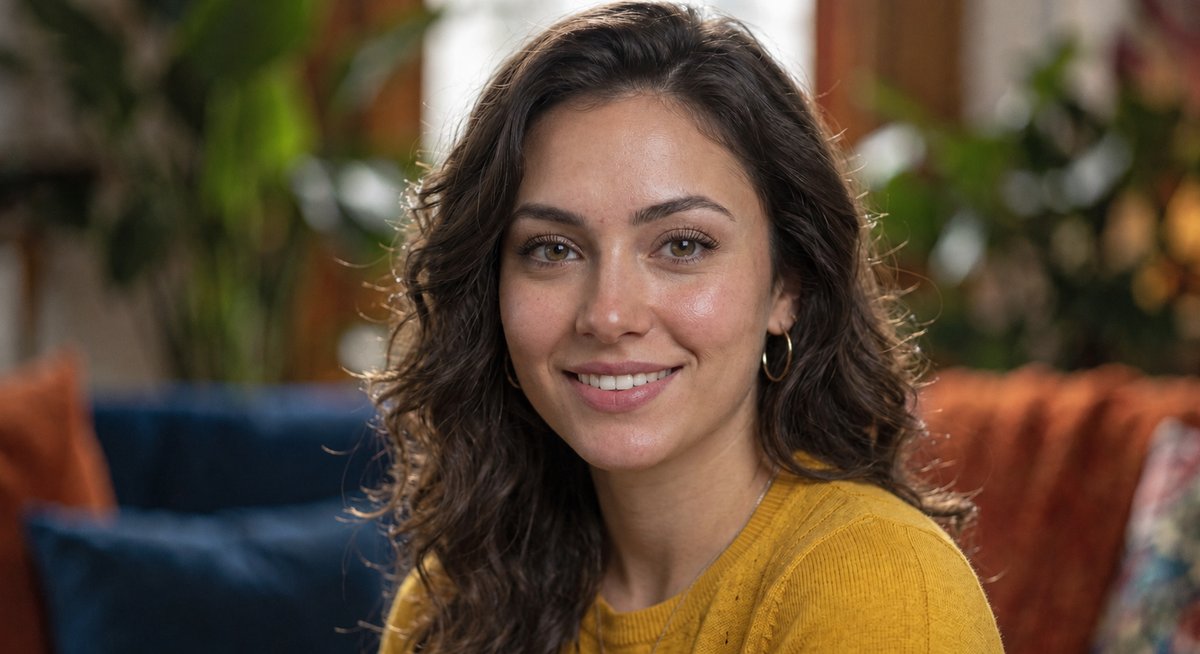
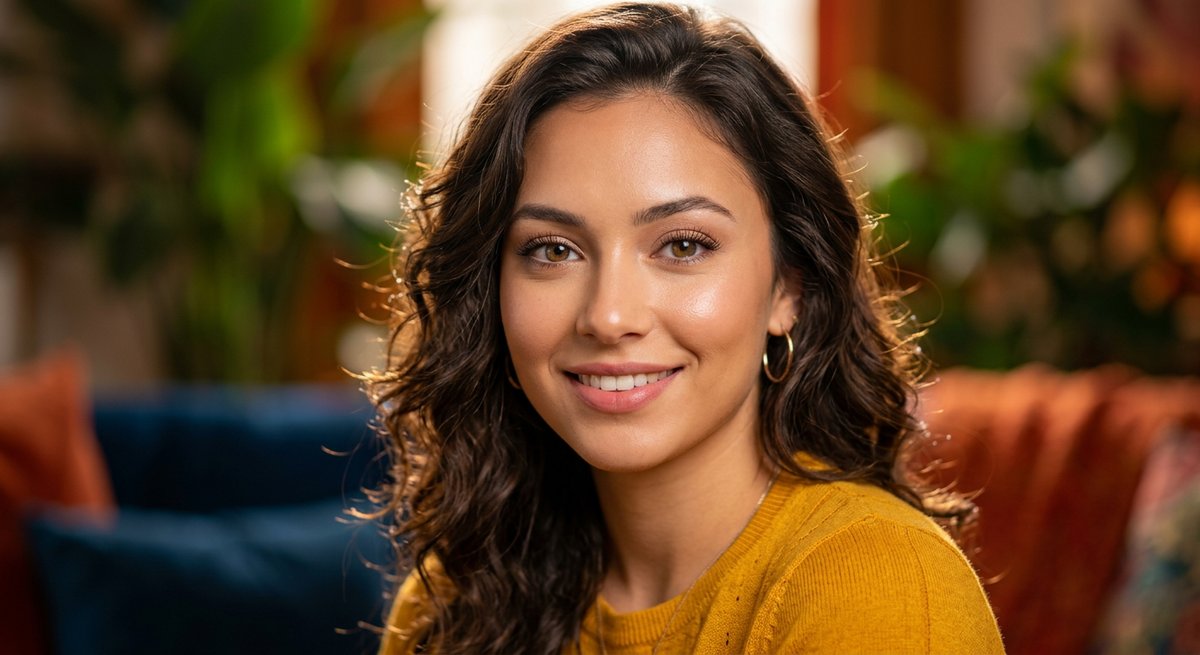
Portrait: from waxy retouch to real skin

An AI-generated portrait with poreless skin and mirror-like highlights on the cheeks and nose. After processing, pores and tiny freckles appear on the cheeks, nose and forehead, highlights turn soft and matte, and skin tone gets slightly uneven — while the person, pose, hairstyle, clothing and background layout stay the same.

Type
AI-generated portrait
Changes
Pores · matte highlights · skin tone
Unchanged
Person · pose · composition
AfterBeforeBeforeAfter

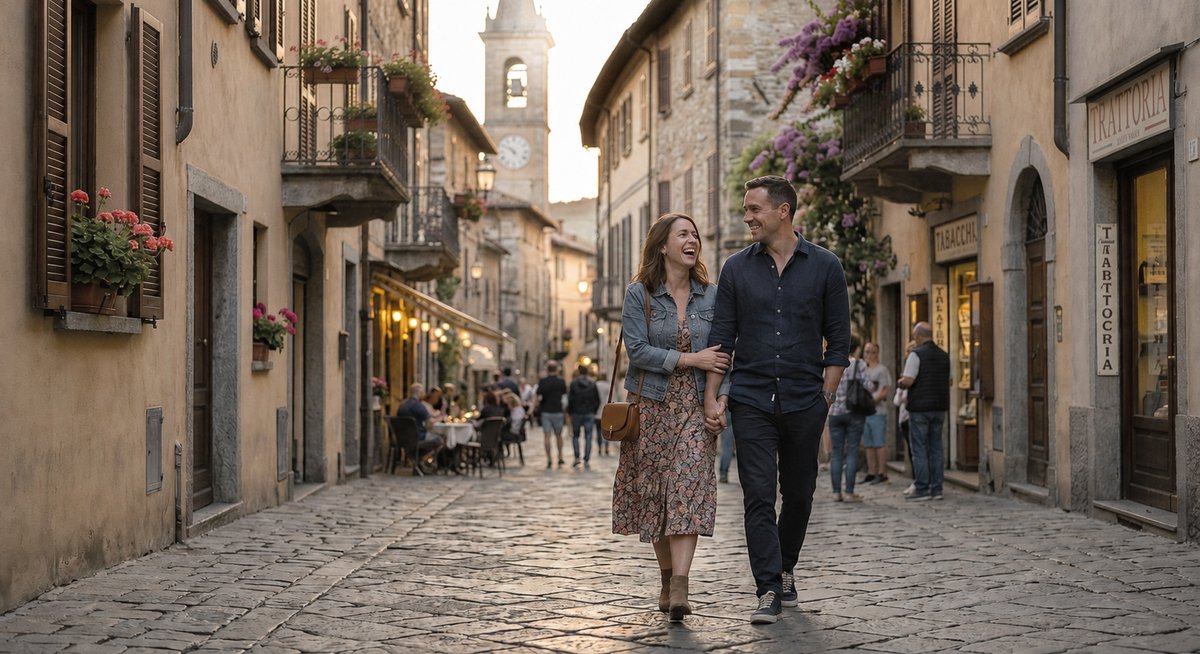
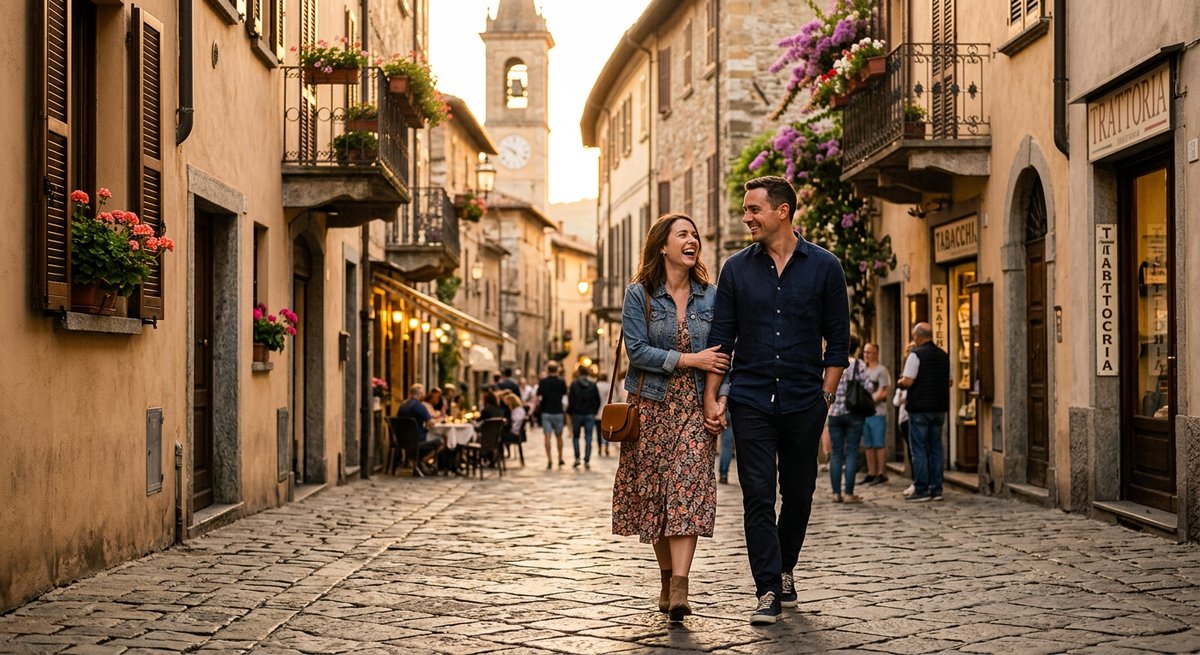
Scene: less filter, more neutral colour

An AI-generated street scene with a heavy orange cast that looks like a film filter. After processing, the colour calms down, contrast turns natural, and skin and cobblestones gain real texture, with the street composition and people unchanged. Note: this kind of image usually ends up more neutral, so some of the warm mood is lost.

Type
AI-generated street scene
Changes
More neutral colour · realer texture
Unchanged
Composition · people placement

Why AI images are easy to spot

  • Waxy skin: no visible pores or fine lines, with strong mirror-like highlights on cheeks and nose.
  • Lighting that is too perfect: bright from every direction, without the direction and shadows a real light source gives.
  • Advertisement-grade colour: more vivid and cleaner than a real camera records.
  • No camera artifacts: no sensor noise, no lens softness, everything unnaturally sharp.

How it works

  • Upload an AI-generated image (PNG, JPG or WebP).
  • If you like, add a note such as "keep the warm tone".
  • Generate; the result arrives in about half a minute and can be downloaded. Not happy? Run it again — each result differs slightly.

Tips for better results

  • Upload the highest-resolution version you have; more detail survives.
  • Portraits change the most — skin is the problem this tool solves best.
  • Prompt your original to look like a casual snapshot first, then use this tool to finish — better than either alone.

Frequently Asked Questions

What does it actually do?

It re-renders your image the way a real camera would have captured it: waxy, over-smoothed skin becomes real skin with pores and fine lines, highlights turn soft and matte, over-sharpening and ad-grade saturation are removed, and a touch of sensor noise and natural background blur is added. The person, pose and composition stay the same.

Which images work best?

Portraits show the biggest change, because the "plastic" look mostly comes from skin. Scene, product and food images also work, but they are less plastic to begin with, so changes are subtler — mainly calmer colour and more natural texture.

Will the face change?

Slightly. This is a re-render, not just a texture overlay: features and face shape stay broadly the same, but small details such as brow shape, mouth corners and cheek contour can shift. It is meant for AI-generated people, not for real photos where the face must be exactly identical.

Will colour and brightness change?

Brightness stays about the same and colour calms down. If your image has a heavy orange cast or very high saturation, it ends up more neutral and some mood is lost. You can write "keep the warm tone" in the extra notes, though it is not guaranteed.

Can it make an image pass AI detectors?

No, and we do not promise that. This tool improves how real the image looks; it does not remove generation traces or metadata, and no detector result is guaranteed.

What is it for, and what is off limits?

It is for removing the plastic look from your own AI artwork, content images, and marketing or social media visuals. Do not use it to fake an identity, fabricate evidence, pass off AI images as real news photos or ID photos, or deceive other people.

Why not just regenerate the image?

Regenerating is a re-roll: composition, people and colours all change, the version you liked is gone, and the new one is not necessarily more real. Here only the rendering quality changes and the picture itself stays.

Is it free to try?

Yes. Signing up gives you 20 credits — enough for 2 free runs — with no credit card and no subscription. After that, pay-as-you-go credits that never expire.

Related Tools

Fix Garbled Text in AI ImagesLove the AI image but the text came out garbled? Box it, type the right words — the picture staysPhoto RestorationUpload a damaged, faded, or blurry old photo — AI repairs scratches and fading, with optional colorizationProduct Photo BackgroundUpload a product photo, get a professional e-commerce background
Featured on
Featured on AI Tools for MarketersListed on Uno DirectoryFeatured on Days LaunchFeatured on Starter BestFeatured on The One StartupFeatured on ShipstryFeatured on DodoDirectoryFeatured on Toolcurio